A free RSVP form that takes guests a minute to answer
Try the form right here, pick the short or full version, add any extra questions from the list below, then open it in the form builder with every field ready. Send one link, print reply cards, or run a quick RSVP poll.
- 5 or 10fields, your choice
- 12more questions to add
- 1 linkfor every guest
- 2 per sheetprintable reply cards
By Michael Hodge, BSc Psychology Updated 23 September 2026
Every field, and why it earns its place
The short version has five fields and covers most parties. The full version adds meals, names, access and a note for weddings and formal dinners. Switch between them in the preview; the form you open matches the one you see.
| Field | Why it is on the form |
|---|---|
| Your name | One box for the whole name. Not every name splits neatly into first and last, and a single field fits the widest range of names.3 |
| Will you be there? Yes, I will be there / Sorry, I cannot make it | The one answer you need from every guest. There is no "Maybe" on purpose: a maybe cannot be booked with a caterer, so the form asks for a decision and the deadline gives people time to make it. |
| How many people are in your party, including you? | One reply often covers a couple or a family, so this is the number you add up. "Including you" stops the most common mistake, where a guest of two types 1. |
| Email for event updates | If the time or the place changes, you need a way to tell everyone. It is optional because one person often replies for a household and you may already have their details. |
| Any allergies or dietary needs we should know about? | A short free-text answer catches what a tick list misses, from sesame to a low-FODMAP diet. Send the answers to the kitchen as they are written. |
| Choice of main course Chicken / Fish / Vegetarian / Vegan / Children's meal | Only for a plated meal. Replace the options with your own menu; the caterer usually wants these numbers at the same time as the headcount. |
| Names of everyone else in your party | Names for place cards, badges or a door list. It also shows you, politely and early, when a party includes someone the invitation did not. |
| Does anyone in your party need step-free access or other help getting in and around? | Gives the venue time to plan ramps, seats near an exit or a spot close to the speakers. It asks what help is needed, never for a medical reason. |
| Mobile number for changes on the day | Email is too slow when the car park moves or the rain plan starts. Keep it optional and use it only for the event. |
| A note for the hosts | Guests who cannot come usually want to say so warmly, and this is where the congratulations and song requests end up. |
Add-on questions guests answer in seconds
Tick any of these and they join the preview above and the form you open. Each one is written to be answered in a few seconds.
Weddings and formal dinners
Parties and family events
Work and community events
Travel and getting there
From this page to a live RSVP link
The form builder opens with your fields already in place. These are the four things to do before you send it.
- 1
Name the event and the deadline
Change the title to your event and put the reply-by date in the intro. Guests read the date first, so make it a real day, not "soon".
- 2
Match the menu and trim
Swap the meal options for your own menu and delete any field you will not use. Every field you remove is one fewer thing for a guest to skip.
- 3
Close it on the deadline
In Settings, turn on Start and End Dates and set the end to your reply-by date, so no replies arrive after you have sent numbers to the venue.
- 4
Publish and send one link
Enter an email address to get your link, then send it by email or chat, put it on your event website, or print the QR code on the invitation. Replies appear in your dashboard as they come in.
Getting every guest to reply
An RSVP only works when the replies come back in time to use. Three habits make most of the difference.

Work back from the caterer, not the party
Ask the venue or caterer when they need final numbers and set your deadline a few days before that. For weddings, Anna Post of the Emily Post Institute suggests sending invitations about eight weeks out with a reply deadline two or three weeks before the day.1 A casual party needs far less: a week is usually plenty.

Count people, not replies
Twenty replies can mean fifty guests. Add up the party-size field, not the number of forms, and read the names field before you print place cards. If children eat a different menu, add the children question from the list above so they are counted on their own.

Chase the missing replies a week early
A week before the deadline, compare the replies with your guest list and message whoever is missing, with the link in the message. Etiquette says guests should reply promptly,2 but people forget, and a short reminder with the link in it is the easiest reply they will ever send.
Only need a rough count, for a team lunch or Friday drinks? A one-question RSVP poll is quicker than a form: people tap an answer with no name or email, and you watch the total as it comes in.
Reply cards for paper invitations
Some guests will always prefer paper. Print the short form as reply cards, two to a sheet, and add the online link so both routes count.
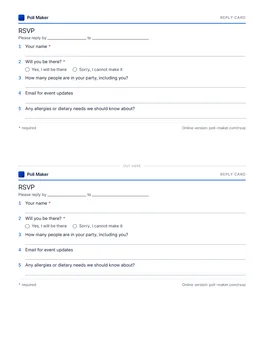
Printable RSVP cards, two per page
The five short-form fields on a half-sheet card, twice on one Letter page. Print on card stock and cut along the dashed line.
Download PDFRSVP wording that gets answered
The line on the invitation matters as much as the form. Give a date, a link and a reason.
What RSVP means
RSVP is short for the French "repondez s'il vous plait": please reply.2 On an invitation it asks every guest for an answer, yes or no. "Regrets only" means the opposite: reply only if you cannot come, and the host counts everyone else in.2 For anything with catering, ask for a reply from everyone. Silence is not a yes you can book.
Lines you can copy
| Event | Wording |
|---|---|
| Wedding | Kindly reply by Saturday 10 April at [your link], so we can share final numbers with the caterer. |
| Birthday or garden party | Can you make it? Let us know by Friday at [your link]. It takes a minute. |
| Work event | Please RSVP by Tuesday at [your link] so we can confirm lunch numbers and name badges. |
| Reminder | We have not had your reply yet. If you can join us, please answer by Friday: [your link]. |
Paper and online together
If you post invitations, print the QR code from the form's publish screen next to the reply-by date, and include a paper card for anyone who would rather write. Type the paper replies into the form yourself when they arrive, so every answer lives in one dashboard.
RSVP form questions
What does RSVP stand for?
It is short for the French "repondez s'il vous plait", which means please reply.2 An RSVP asks every guest for an answer, whether or not they can come.
How far before the event should the RSVP deadline be?
Work back from the date your venue or caterer needs final numbers. For weddings, Anna Post of the Emily Post Institute suggests a reply deadline two or three weeks before the day, with invitations sent about eight weeks out.1 For a party, one week is usually enough.
Do my guests need an account to reply?
No. They open your link, fill in the form and send it. You build the form without an account and enter an email address when you publish, to get your link.
What should an RSVP form include?
At minimum: the guest's name, whether they are coming and how many people are in their party. Add allergies for anything with food, and meal choices only for a plated menu. The short version on this page is exactly those five things, plus an email for updates.
Should I include a "maybe" option?
Not on the form. A maybe cannot be passed to a caterer, and the deadline exists to turn maybes into answers. If you only want an early sense of interest, run the quick RSVP poll instead, which has a "Not sure yet" answer.
What if a guest needs to change their reply?
Ask them to send the form again and say so in the note. Sort the replies by time and keep the latest one for each name. Close the form on your deadline so changes stop when your numbers are final.
How do I stop guests bringing people who were not invited?
Name everyone who is invited on the invitation, and use the full form, which asks for the names of everyone in the party. If a name you did not expect appears, you can talk to the guest well before the day. For a hard limit, use an RSVP form creator that caps plus-ones: PulseFormCreator, a sister product of Poll Maker, gives each invitation its own link with a seat limit and only asks about the party once a guest has said yes.
Can I print the RSVP form?
Yes. Download the reply cards above: two short-form cards on one Letter sheet, ready to cut and post with paper invitations.
Know who is coming before the caterer asks
Your guests answer in a minute, and you get the numbers, the names and the allergies in one place.